Showing posts with label Social-Sites. Show all posts

Tuesday, 22 March 2016

How to Change the Language in Facebook

How to Change the Language in Facebook

Most of the people don't know the method of how to Change the Language in Facebook. Different type of people and different type of languages use in the world. Mostly people don't understanding the other type of language, they need to translator to convert one type specking word in her language. 

You also know that Facebook is top social connecting website, which is use overall in the world. So, Facebook providing the Best Method of change the Languages. Through this method you can easily understand the option of Facebook and those post who send your friends. Most users are face this problem and reporting their Facebook account language or show word has been changed to Vietnamese, French, Polish, Arabic etc. Many user use the Facebook in English Language.

Recently Post:


If you want the method of how to change the Language in Facebook. Follow my bellow some simple steps. Thought this you can easily change in any type of language.

Step by Step with Picture:

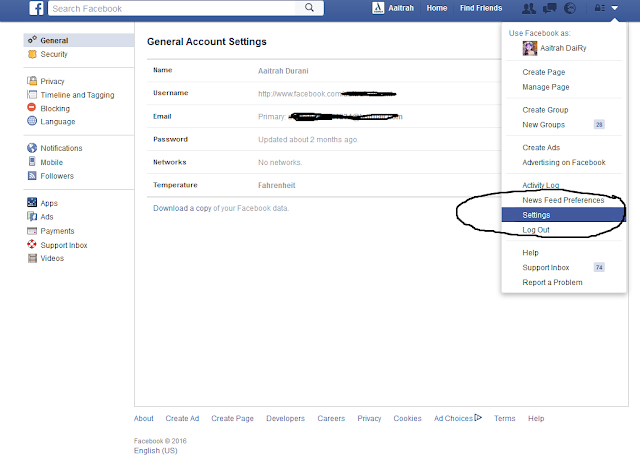
  • First of all login to your Facebook account then click top right down arrow  and go the Setting option.


How to Change the Language in Facebook

  • After open the setting option next click on the English which is present at left bottom.

How to Change the Language in Facebook
  • Now you see the all type of languages and Select your Language.


How to Change the Language in Facebook


Monday, 21 March 2016

Post Blank Status or Comment on Facebook - 2016


Post Blank Status or Comment on Facebook - 2016
Asalam-o-Alikum again user! Well, today I am writing a good little bit much attractive Facebook tricks. Our this post about how to make a Blank Comment or Status on Facebook. This is a funny and amazing trick for you and full free. Posting a blank status or comment sometimes may help you to more likes get than a normal or simple quotation. Many my friends say that post the article about how we Empty Status Update. This is one of the best tips or trick for increase your likes and something share new with your Facebook friends. And also this post help you get more popularity with friends. I think you know that now social sites are times part of life, because everywhere in the world the Facebook follower become increasing. How to Change the Language in Facebook. Are you want to your Friends Attention on your updates on post, status, comment.  

How to Get More Likes by Post Blank Status or Comment:

You also know social websites features like their Google Plus Circles, Followers, Twitter Tweets, Facebook Likes and like this other many is most Important for increase your views. In Facebook you knowing when you post any status you getting more reply in comments and likes. It will give popularity you and your post by comments and like on the social networking field. I think you try to getting comments and likes on your post but not it's easy. If you share unique status like  How to Recover deleted Facebook Massages or Similar attractive like this post. Actually when you will share more best, helpful and unique then you can get easily more best response on your updating. So, blank comment or status method is much different. you can also use this trick in post or comment then share it through this you get more popularity.


How to Post Blank Status or Comment:


  •  First of all login to your Facebook Account. And click on the Status box or any  friend in post Comment session.

  •  Now copy the code and past on your post & status. After few moment you    watch blank comment and status nothing their any thing. 
                                                         Code: @[0:0: ]

This code is 100% working, go and try it but sometime this code perfectly not working, then hold the key of "ALT"  and type the number 0173. For example:


  •  Press ALT + 0173  and Update it You saw a blank status


Sunday, 20 March 2016

How to Change Facebook name Before 60 days

 How to Change Facebook name Before 60 days
Hi Tips Center user! I hope you are in good movements. Today I want discus about how to change Facebook name Before 60 Days. You also know that Facebook is one of the best social site to interact with family and friends to do chatting, post share and other activities. Facebook is good thing is that you spend extra time online. We understanding what is in the daily viral and trend by increases user. We use Basically Facebook for share images, status, and our memories. Post Blank Status or Comment on Facebook - 2016 In Facebook we have to add our personal some information which is show to user and required to Facebook. In which we add personal our related details like name, date of birth, bio, status, work, education. So it will make easy anyone who fine you on Facebook. 

Change Facebook Name Before Time Limit:

After some days if we change Facebook name. When we enter new name it will give us 60 days say change your name after 60 days. I think you mostly face this problem or see you’re this problem in friends account. If you want to change name before 60 days and you don’t know the solution of this. How to Increase your Laptop Battery Life Easily  I hope through this post you will get you problem solution. Here is the trick to change your name. Follow simple steps.


How to Change Name through Illegal Method                              


Step by Step with Pictures:

  • Login your Facebook ID


 How to Change Facebook name Before 60 days


     How to Change Facebook name Before 60 days

    • Now it will ask for your password give it
    • Choose your email.


     How to Change Facebook name Before 60 days
    • Then there will options that which name you wanna keep. Select your other name.


     How to Change Facebook name Before 60 days
    • Click on save and you are done 

    How to Change Name through Legal Method                               


    • Edit a card and write Name on that you want to add on Facebook and Date of Birth  that also on Facebook


    • Type first and last name

    • Scroll down and choose legal name change or others

    • Upload id card pic and send.

    • Facebook will responded in 24 hours.

    Friday, 18 March 2016

    How to Recover your Hacked Facebook Fanpage - 2016

    Hi friends, Today i bring the one of the best article which you learn how to Recover your Hacked Facebook Fanpage. Some time the Facebook your or your friend hack your fan page. If you need the solution of your Facebook fan-page recovery. Then follow my below steps.


    Related Posts:

    Nokia Symbian and Android Mobiles Short Codes


    1st Method

    Step: 1

    Go to this link Click Here.


    How to Recover your Hacked Facebook Fanpage - 2016

    Step: 2

    Fill the from, which is they need about your page related

    2nd Method

    Step: 1

    Go to this link Click Here.


    How to Recover your Hacked Facebook Fanpage - 2016

    Step: 2

    Just type your Issue and click on send button. After some time you will receive the email through Facebook.

    Things which need for this Method:

    • You should be the creator of the page (that is you need the creator account to recover your page)
    • You should remember the date of creation of the page
    That’s it, it looks so simple, but it’s not as simple as it looks. It’s quite difficult to make
    Facebook members believe that the page that you want to recover is yours name of the
    • Hacked page:
    • Date of creation of the Page:
    • Hacked page URL:
    • Information and Details of your Page:
    • How was it hacked or how your page disappeared : (complete information about how that person hacked your Facebook page) 
    Every request will not be approved, Facebook should think it is legible you should write it in such a way that Facebook should understand that the page is yours. Facebook will check out the details, zones and much more information to check weather its really hacked or you want to get back your traded page please use this request method only if your page is really hacked. If not it’s just time waste. Facebook development members arevery clever.

    Wednesday, 16 March 2016

    How to Recover deleted Facebook Massages- 2016


     How to Recover deleted Facebook Massages- 2016
    Through this post you will learn how to recover deleted Facebook Messages. Some time you face the problem your important Facebook of deleted massage. If you want to recover your Facebook massages. So, you come at right website. This blog post helps your problem and gives you the solution method. I’m 100% said that whenever you open on Google & search that the queries of “Recover deleted messages of Facebook” or “how to retrieve messages of Facebook” then you will see most of fake articles and posts there. This is just wasting your time to read and click they fake posts. So no other blog or website give you the real method of Facebook deleted massages full and free. Facebook massages are the best method for chatting. Through this you will always touching with your friend and family.

    Related Posts:

    Nokia Symbian and Android Mobiles Short Codes


    Follow me Step by Step:


    • First of all open your Facebook account which you want Massages recovery.
    • After that open your General settings

     How to Recover deleted Facebook Massages- 2016


    • Their you can see the option of download the copy data of your Facebook account, click on this and download this file 

     How to Recover deleted Facebook Massages- 2016

    • Then click on the download Archive Messages option
     How to Recover deleted Facebook Massages- 2016


    • Enter Your Password and enjoy the recover of your deleted Facebook massages.

     How to Recover deleted Facebook Massages- 2016


    Friday, 11 March 2016

    How do i see Hide my friends list on Facebook - 2016

    How do i see Hide my friends list on Facebook - 2016

    You know your some friend are not show but they will contact, status share etc share you. So today i will show you how do i See hide my friends list on Facebook. This is full active trick and created in 2016. most of Facebook. Some people not show his and her profile to everyone and they active the option of hide. Most of problem created in new account, because Facebook update everyday. that's way you face some issues in your Facebook account. If you want to see you all friend who are hidden in your friend list. then do the bellow some step and show your friends.

    Most View Posts:

    Follow me Step by Step:

    • Send a Friend Request to the person who's hidden friend list you wanna view.
    Re-member: you must send only one friend request from your new fake account.

    • After sending the friend request a list will be appear on your Home Page.
    How do i see Hide my friends list on Facebook - 2016

    • People may you know click 'Show All' button.

    • All the hidden friends of the person will be started to appear on your homepage Enjoy.

    Wednesday, 9 March 2016

    How To Block or Remove any Facebook Account - 2016


    How To Block or Remove any Facebook Account - 2016
    This post is all about of how to Block or Remove any Facebook account. Facebook is social website which you are always touching with your friends and family. 
    There are your are share your Ideas, picture, Website promotion, Videos, and much more. some time you are busy, not using Facebook account or when anyone user disturbing you and  want to remove or block there or own account. Through this post you learn easily apply this problem solution on anyone Facebook account.  There i am showing you two method of Removing and blocking any account of Facebook. 

    Related Topic:

    How to find Facebook User ID or Profile in Miniclip - 2016

    Grand Theft Auto San Andreas version available for Android


    1st Method:


    • Create new Facebook id with date of birth and same name of victim's id.

    •  Go to this link and check the "Someone is pretending to be me" and fill the form.


    How To Block or Remove any Facebook Account - 2016


    • Victim's id will be removed within 24 Hours.


    2nd Method:


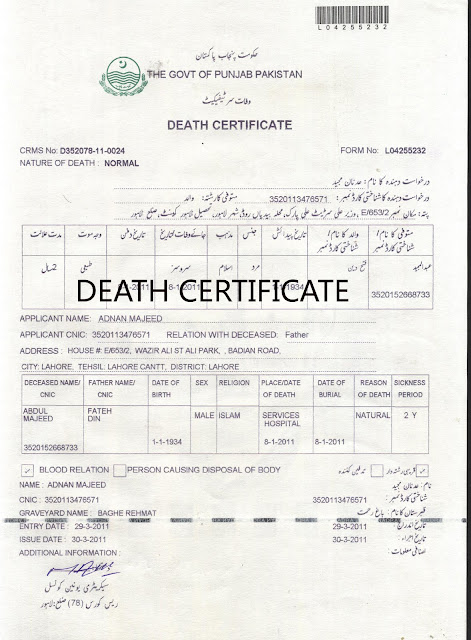
    • Using "Death Certificate"   

    How To Block or Remove any Facebook Account - 2016


    • go to this link and upload death certificate. 


    How To Block or Remove any Facebook Account - 2016

    • Victims id will disabled within 24 Hours.


    Tuesday, 1 March 2016

    How to Colorful Texts in Facebook Comment or Chat Box - 2016


     How to Colorful Texts in Facebook Comment or Chat Box - 2016
    Aslam-o-alikum friends. Today i am bring how to Colorful texts in Facebook Comment or Chat Box. A lots Of people ask about me this tricks, Its is really Impressive. You can send color texts in Facebook chat or in comment box. But its quite simple, because first you have to set all codes. Otherwise it is amazing trick. Use this codes in your text and when your friend looking your comment they, How do you  do this? Try it and share with your friends on social sites (Facebook , Google plus, Twitter, LinkedIn etc)


    Hello Colorful Texts:

    Try this codes copy and past below code in chat box for "Hello"

    • [[111356865552629]] 
    • [[115430438474268]] 
    • [[115807951764667]] 
    • [[115807951764667]] 
    • [[116564658357124]]
     How to Colorful Texts in Facebook Comment or Chat Box - 2016


    FBSX Colorful Texts:

    Copy the below Text codes for "FBSX"  and past in Facebook comment box.

    • [[109225112442557]] 
    • [[116067591741123]]
    •  [[115927268419031]] 
    • [[116740548336581]]


    Some Codes are below with their Alphabets


    • [[107015582669715]] = A

    • [[116067591741123]] = B

    • [[115602405121532]] = C

    • [[112542438763744]] = D

    • [[115430438474268]] = E

    • [[109225112442557]] = F

    • [[111532845537326]] = G

    • [[111356865552629]] = H

    • [[109294689102123]] = I

    • [[126362660720793]] = J

    • [[116651741681944]] = K

    • [[115807951764667]] = L

    • [[106596672714242]] = M

    • [[108634132504932]] = N

    • [[116564658357124]] = O

    • [[111669128857397]] = P

    • [[107061805996548]] = Q

    • [[106699962703083]] = R

    • [[115927268419031]] = S

    • [[112669162092780]] = T

    • [[108983579135532]] = U

    • [[107023745999320]] = V

    • [[106678406038354]] = W

    • [[116740548336581]] = X

    • [[112416755444217]] = Y

    • [[165724910215]]  = Z

    Note:


    This all code work only on browser. Enjoy and fun your friend with using these colorful texts.

    Sunday, 28 February 2016

    How to Create Stylish Comment in Facebook - 2016

    How to Create Stylish Comment in Facebook - 2016
    Facebook now a days is the use of every one. In this post you will see how to Create Stylish Comment in Facebook. There are lots of many tricks of it. Some posted before in last posts and more new tricks will be posted further too. Here is one of awesome trick for Facebook chat or Facebook comments or you can keep your group names colorful. The below colorful codes will work better by using Facebook Lite you can get Facebook lite from play store.
    Simply you just have to copy one of your favorite color code and paste it in chat or in comments with your text like i am going to type Aaitrah in colorful so i will type it like this <fg=b0ffc0cb>Aaitrah

    How to Create Stylish Comment in Facebook - 2016


    Enjoy these awesome codes stay connected for more awesome codes.


    • <fg=b000ffff>Aqua
    • <fg=b0000000>Black
    • <fg=b00000ff>Blue
    • <fg=b0a52a2a>Brown
    • <fg=b0d2691e>Chocolate
    • <fg=b00b22222>Fire Brick
    • <fg=b0ffd700>Gold
    • <fg=b0808080>Gray
    • <fg=b0008000>Green
    • <fg=b04b0082>Indigo
    • <fg=b0f0e68c>Khaki
    • <fg=b07cfc00>Lawn Green
    • <fg=b000ff00>Lime
    • <fg=b0ff00ff>Magenta
    • <fg=b0191970>Midmight Blue
    • <fg=b0000080>Navy
    • <fg=b0808000>Olive
    • <fg=b0ffa500>Orange
    • <fg=b0da70d6>Orchid
    • <fg=b0cd853f>Peru
    • <fg=b0ffc0cb>Pink
    • <fg=b0800080>Purple
    • <fg=b0ff0000>Red
    • <fg=b02f8b57>Sea Green
    • <fg=b0a0522d>Sienna
    • <fg=b0c0c0c0>Silver
    • <fg=b000ff7f>Spring Green
    • <fg=b04682b4>Steel Blue
    • <fg=b0d2b48c>Tan
    • <fg=b0008080>Teal
    • <fg=b0ff6347>Tomato
    • <fg=b040e0d0>Torquoise
    • <fg=b0ee82ee>Violet
    • <fg=b0f5deb3>Wheat
    • <fg=b0ffffff>White
    • <fg=b0ffff00>Yellow
    • <fg=b09acd32>Green

    Popular Posts